
Marking Your Own Little Piece of Camgirl Ground
Granted I’m old school, but even in the age of link list services I still think it’s important for us independent camgirls to have our own websites, for a few reasons that I’ll explore below.
Credibility
As independent camming on services such as Discord and Telegram becomes more popular, it’s vital that you’re able to distinguish yourself to prospective clients as a professional cam performer running your own legit business. Having your own website is a huge part in that; scammer dudes cat-fishing on Telegram with stolen pics don’t have websites with links to their listing sites for payment processing or video stores. Even on a simple shared hosting plan (more on that below) you can post preview videos to show the guys who contact you what they can expect in terms of lighting and cam quality, which helps greatly in reducing the number of those annoying sorts who ask for free live previews.
Maintaining Your Client List
Anyone on any platform is ultimately a guest of that space, and that goes double for those of us who work in adult. The reality is any site or service we use could shut down or kick us off tomorrow, and thus it’s vital that you have a way of contacting your clients should the worst occur. Ask anyone who built a business based on Insta and then got kicked off for showing too much bra or something equally ridiculous. Your client list is your business, and thus it’s massively important that you own and control it. The only way to do that is to own the domain. For example, on my website Quinn69.com the second time someone visits a little pop up appears where they can opt to subscribe to my mailing list if they so choose (if not they can just close the pop up and it’s gone for good, so as not to annoy returnees who don’t wish to join). For those who do, it’s a great way to keep in touch with my guys to let them know about any specials I run in terms of cam show and/or content, and as long as I don’t spam them they’re really happy with the occasional messages they get from me.
Showcasing What You Offer
However you choose to design your site, this is your place to write what you want, use images and colours to establish a mood, link out to sites where clients can view you on live cam (with a referral link obvs) if you also work big box, link to your clips sites so they can purchase your content, sites upon which you accept payment (I recommend LiveCamModelShows.com, of course)…you get the idea.
Describing the types of shows you offer also cuts down on having to type out a whole spiel about your shows every time someone new contact you. It’s true that some client don’t like to read, will never read lol, but a lot really do, and having a site where they can get a better sense of you even before first contact on Telegram or Discord makes life a lot easier for you both.
Creating Your Own Site
Buying a Domain
I would recommend NOT buying both a domain and hosting from the same company for one simple reason: if the host flails out for any given reason you need to be able to access your domain in order to point your name servers to a new host. Your domain is protected no matter what, but hosting companies do come and go.
There are a ton of domain registrars out there so take your pick, personally I go with Namecheap as they always have a ton of coupons out there on the net that come in handy around renewal time (I own a lot of domains), but that’s just one option amongst many.
Take some time to think about exactly what domain you want to best suit your brand, and also what you want in terms of domain extension. You have dozens of extensions to choose from but keep in mind that for type-ins web surfers still tend to automatically think in terms of .com. Whatever you choose, I would highly recommend not opting for .xxx which is a ridiculous waste of money and a way to scream out ‘adult’ in a world where hostility towards us and our work is increasing.
Choosing a Host
Your decision on hosting will depend on what type of site you wish to build and how much traffic you expect to receive. For a simple site with a few pages and not a lot of self-hosted videos, that won’t be getting 100’s of 1000’s of visitors per month, a shared hosting account should be more than enough. Many hosts do not permit adult content but some decent ones do, one example being Hostgator. This host comes with free SSL and a CPanel wherein you can install WordPress easily. I used Hostgator back when I was just starting out on my own, and I was quite pleased with them.
If you’re planning something more involved and elaborate go with a VPS or dedicated server with either MojoHost or TMDHosting. No ref links, they deserve the praise and non-monetized recs.
Setting Things Up
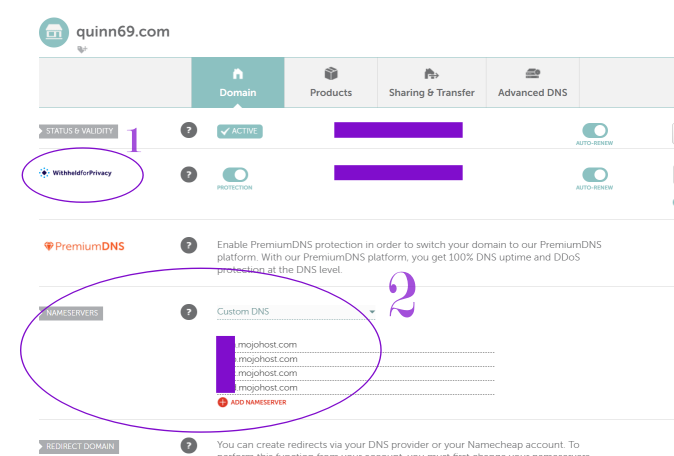
Once you’ve purchased your domain and your hosting, you need to point your nameservers to your host. Log into your domain registrar and click on ‘Manage’ (or whatever terminology your registrar uses) and first things first, before anything else, ensure you have WHOIS privacy enabled. See ‘1’ on the screencap below.
Next, as per ‘2’ on the screenshot below, set your option to ‘Custom DNS’ and then input the nameservers provided by your host. Generally there will be two. Then save and you’re done. Propagation can theoretically take up to 48 hours, but I’ve never seen it take more than an hour or so and even that long a wait is rare.
Installing and Setting Up WordPress
There are a bunch of CMS’s (content management systems) out there, but I’m a huge fan of WordPress as it enables you to build something amazing even if you’re like me who didn’t even know html when I made my first site. Most hosts offer a ‘one click’ install of WordPress in your hosting panel, and it really is that simple. One important thing to note though, in creating your WordPress installation do NOT use ‘admin’ or your cam name or anything easily guessable as your username. Make it really obscure, no one will see it but you.
Once your WordPress is installed, log in and install a theme via Appearance > Theme in the left hand sidebar. Do not delete the default theme, as it’s important to have should anything go wonky with your chosen theme. Will you ever use it? I never have, on any of my sites, but it’s important to keep around just in case.
In choosing a theme you have about a zillion options to choose from, both free and paid. Browse wordpress.org for free options, or check out themeforest.net for paid options.
Setting You Public Username
For site safety you never want to post content using your ‘admin’ login username. To create your public username, click on ‘Users’ in the left sidebar and then scroll to the ‘Name’ section. Your admin username cannot be changed, but under that you can add a nickname, which can be anything you want publicly accessible to site visitors. Once you’ve created the nickname, in the drop-down set ‘Display name publicly as’ accordingly.
Plugins
Next up is plugins. With these you can add features and elements to your site without having to hand code them yourself. Some also help protect your site from hacks and bot attacks, facilitate site speed (important for page loading time) and enable you to tweak page html in ways that go beyond the Visual page creator. You don’t want to use too many plugins, as that can be a drag on page speed and be an entry point for hacks and malicious code injections, but a few can make a massive difference in how much you’re able to play around with your site in order to make it really unique, as well as protected from outside attacks.
Recommended Plugins
1) Wordfence. This plugin is vital, don’t even think about not using it. While there is a paid version with premium features, the free version is more than enough to keep out wannabe hackers and brute force attacks. As a popular CMS, your site will be hit by bots, scrapers, crawlers trying to find vulnerabilities, idiots trying to break in to your back end by guessing passwords, etc, etc. Wordfence deals with them all. Install it.
2) Classic Editor. The visual page/post composer sucks in that it’s incredibly limiting. With the Classic Editor plugin (free) you can switch to ‘code’ composer to add elements to links and experiment with html if you’re not familiar with it already. You can switch back and forth between the Visual and Code composers all without leaving the page, so it’s not a matter of having to choose one method of composing over the other.
If you’re new to html, w3schools.org is a wicked free resource that will teach you the basics in no time.
3) Shortcodes Ultimate. I love this plugin. It’s free and makes it easy to create elements such as columns, rows, accordions, video embeds…the list goes on and on. It’s free and lightweight and with it you can make drastic customizations to each page of your site far beyond what any theme other than perhaps Divi ( a very popular, highly customizable theme) can offer.
4) Microsoft Clarity. This plugin doesn’t really serve any purpose other than to allow you to see not only who is visiting your site in real time, but also what pages they visit, what they click on, how far they scroll, what nation they’re from, whether they are a return viewer or brand new…just a neat little free tool beyond what you get from Google analytics.
5) Newsletter by Stefano Lissa. If you opt to create a subscriber list, this free plugin has options such as a pop up or an embed on a page or widget. There are quite a few subscriber/newsletter options out there, but most are either paid or don’t permit adult. Newsletter is fine with us, but even if that changes down the road, as your subscriber list grows you can easily export/download your list at any time.
6) Yoast SEO. While there is a paid version with many addition features, the free version of Yoast is great for the bare bones of SEO such as setting meta data, getting the hang of using keywords, etc. In truth this plugin is annoying as hell as I feel like it’s always trying to upsell me to Premium as I navigate the plugin in the WordPress back end, but I never get spam or anything like that. In sum, it’s aggravating but extremely useful, particularly if you’re new to SEO.
Essential Pages
Even if you plan your site to be a one page ‘calling card’ landing page, I’d still recommend creating a Privacy Policy page and a 2257 page. Using Yoast you can easily noindex these two additional pages so they don’t end up in search results. These two pages add to your credibility, particularly if you use a subscriber plugin like Newsletter.
And That’s It: You’re Done 🙂
If you opt for a free theme and free plugins, your total costs for domain and hosting should be around $40-$50 per year. In terms of maintenance, just log in to your site from time to time to check for updates to plugins, themes and WordPress version. If your website experiences an attack, the Wordfence plugin will notify you via email provided you follow the steps to set up your firewall in the plugin settings.
I didn’t mean to write this much, but I hope this post helps if you’ve been considering branching out from reliance on link list services that you don’t own/control. Your own site is your own, no one can kick you off it or deny you access to your client list. Besides, it’s actually really fun making something that’s as unique as you are.
Peace and Love <3