Do We Even Need FTP Anymore?
Probably not, as most clips sites these days have browser based systems for uploading sex and fetish cam girl clips. It’s still a useful tool to have on hand though, or a rare occasion that you say, wish to download the catalogue of your Clips4Sale store, or come across a site that still uses FTP for uploads. Is it a tool you’ll use often? Nope. Still handy to know how to use it though, should the occasion arise
What is FTP, and How Do Independent Camgirls Use It?
FTP stands for File Transfer Protocol, and it’s basically the generic name for any downloadable program that allows you to upload files without using a slower-paced browser-based system. One of the most popular forms of FTP is a free, open source program called Filezilla, which can be downloaded here. After downloading the program, open it up and you’ll reach a window that resembles the screenshot posted below:
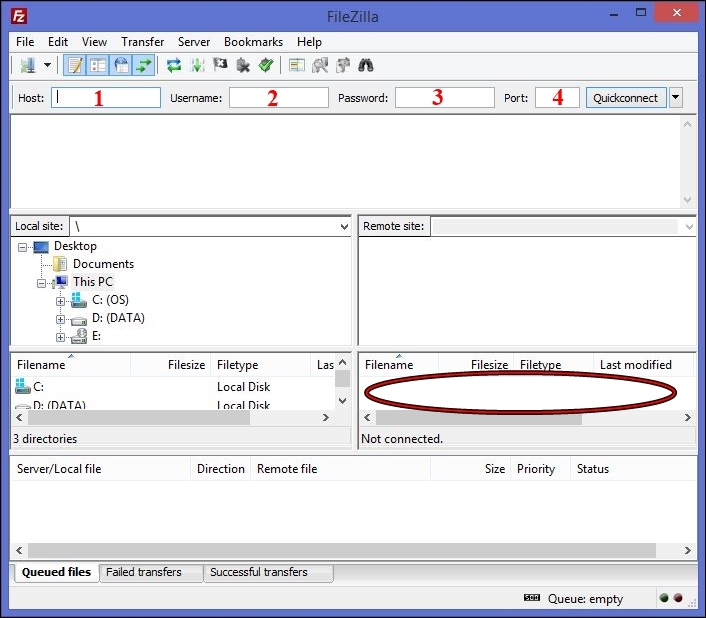
To log into Filezilla and upload files through the program:
Enter the ‘HOST’ name in box #1.
Enter your ‘USERNAME’ in box #2
Enter your ‘PASSWORD’ in box #3
For the ‘PORT’ box #4, the default port is 21. Unless the site to which you are uploading files specifies a port other than 21 you can leave this box blank
Then click ‘QUICK CONNECT’, the box to the far right of the login area.
Once logged in, open a screen that contains your files. Click on the file you wish to upload and drag it over to the area circled in red. Some sites require you to upload files to a specific target folder within that space, however in general unless that space already contains folders simply drag your desired file to the empty box. If you’ve done this correctly you should see your file appear in the very bottom section on the far left titled ‘Queued files’. Once the file has been completely uploaded it will appear in the ‘Successful transfers’ list. And that’s it, you’re done. 🙂
The Sum Up
Your probably won’t use FTP often, but it’s a program that’s still around and very useful at times. If you ever need it, it’s simple to download and use safely, using the steps above. And a VERY useful tool if your external hardrive gets corrupted and you fear you’ve lost your back catalogue of content (C4S to the rescue haha)